Roland PM-16 Drum Pad To MIDI Converter
Update: 02/28/2026
Roland makes a LOT of electronic drum gear... beatboxes,
whack-a-pads (think "whack-a-mole" games), drum modules, drum pads,
drum kits. One of their most useful drum accessories is their PM-16
Pad to MIDI converter - it converts electronic drum pads or drum
mics to MIDI signals. With this box I can use my choice of drum pads as
MIDI controllers, and I wound up with a good variety of them as I
browsed music stores over the years.
The PM-16 does one thing, and does it well. Sad that Roland no
longer makes a similar product. It accepts up to 16 pad/trigger
input channels that can be mic or line level sources, each with
sensitivity pots. 64 user drum programs can be stored. For
initializing pads: you connect a MIDI sound device in omni mode
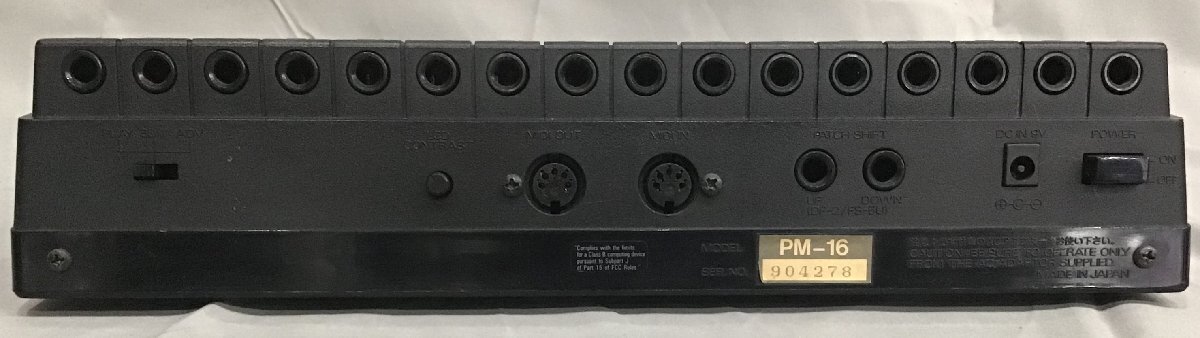
(responds to all MIDI channels), set the mode select switch on the
back to PLAY, set all the input channel level switches to LINE, set
all the channel sensitivity pots to about 9 o'clock (see picture), plug in a pad
one at a time, strike the pad and hopefully the MIDI sound device
will make noise. Press the LEVEL button to see it display the level
of the input channel - it should scale between 1 and 126. The TRIG
LED should flash when the PM-16 detects the pad when you strike it.
If the MIDI sound device makes noise no matter how hard or soft you
strike the pad, check the LEVEL display which may be displaying
almost all high numbers. If you see this, then gradually turn down
the sensitivity pot for that input channel until you see a variety
of numbers.
If the MIDI sound device makes quiet noise no matter how hard you
strike the pad, check the LEVEL display which may be displaying
almost all low numbers. If you see this, then gradually turn up the
sensitivity pot for that channel until you see a variety of numbers.
If the MIDI sound device makes little to no noise no matter how hard
or soft you strike the pad, check the LEVEL display which may be
displaying almost all low numbers or not changing at all. Make sure
the TRIG LED is flashing. If it is not flashing, try turning up the
sensitivity pot. If you're still seeing low levels, set the
sensitivity pot back to 9 o'clock and change the switch to MIC. MIC
position has higher gain - now you should see level when the pad is
struck.
Try to optimize switch and sensitivity setting for levels between 1
and 126 on the LEVEL display. Repeat for the rest of the
pads/triggers.
Only tonight have I noticed that channels one and two are marked for
bass (kick) drums, but the manual does not point this out or explain
why. A study of the schematic revealed slightly different components
in the channel processing circuit - I will study it more later.
The mode select switch
on the rear panel has three positions - play, edit, and adv
(advanced edit). Play is self explanatory. The bank and number
buttons select the drum program. There are eight banks, each with
eight user programs.
This is not a tutorial on operating the PM-16 - the owner's manual
is easy to find online. The manual is actually better than most
Roland manuals.
Before editing any programs, make a copy of the one targeted for
editing. Use the COPY button for this. The reason for this step is
because the WRITE operation writes only to the current program. User
programs can have names.
Edit is basic editing settings. The editor will "chase" the pad
being struck by changing the channel to be edited. Basic editing is
done using the cursor buttons to select the parameter in the display
and the endless encoder Alpha dial allows you to change:
- MIDI channel number (all pad inputs)
- MIDI note number per pad
- MIDI program change number: when the drum program is selected,
this MIDI program change number is sent to the MIDI output.
- Gate Time per pad: some sounds on MIDI devices only play until
a MIDI Note Off command is received. Gate Time sets the length
of time before a MIDI Note Off is transmitted.
- Threshold per pad: used to reduce crosstalk between other
pads. The input channel only triggers when the input level
exceeds the threshold.
Values of most parameters like "Gate Time" and "Threshold" are
abstract numbers with no relation to any real world measure. Typical
of Roland products.
Advanced editing adds the following parameters that can be changed:
- MIDI channel number (per pad input)
- Dynamic Curve: sets the scale of MIDI note velocity relative
to input channel level. "3" is linear, "1" and "2" are varying
log curves, "4" and "5" are varying exponential curves.
- Dynamic Pitch: MIDI note varies with input channel level. Can
raise or lower the MIDI note pitch with varying depth, or
disable "OFF"
- Bend Depth: MIDI Pitch Bend* automatic transient is
transmitted with MIDI Note. Can raise or lower the pitch bend
depth, or disable "OFF"
- Bend Decay: MIDI Pitch Bend* automatic transient is
transmitted with MIDI Note. Can raise or lower the decay time as
the pitch bend returns to zero.
- Dynamics Bend: MIDI Pitch Bend* varies with input channel
level. Can vary the pitch bend depth with input channel level.
- Minimum Velocity: no matter how weak the input channel level
is, this minimum MIDI Note velocity is transmitted.
- Layer: allows simultaneous triggering of up to two other input
channels when this input channel is triggered.
- Retrigger Limit Time: typically used with mics on acoustic
drums with excessive undamped ringing that causes a false
trigger. Sets the time after the initial trigger to ignore
undamped ringing as a false trigger. As Threshold limits the
lower level, this parameter limits the time before another
trigger is valid.
* Use pitch bend sparingly - MIDI pitch bend messages are for the
entire MIDI channel, not per MIDI note. Too many pitch bends on
multiple input channels can have odd results.
In advanced edit mode, you can use the Program Number buttons to
trigger the selected input channel. The bigger the number on the
program button, the higher the channel level.
The COPY button is used to copy programs from one location to
another, or to copy input channel(s) from one program to another
program or to another input channel. This can reduce some duplicate
editing. The WRITE button completes the copy operation.
Sysex patch dumps are accessed using the MIDI button. Warning -
despite rigorously saving patch sysex data, when I replaced the
failed memory backup battery and attempted to restore the lost
patches using my saved patch sysex data, the load operation failed
and the data did not work. I had to restore all my programs by
manually. Does anyone at Roland even beta test these things?
Another 64 user programs can be saved on the Roland M-128D memory
card. Only the Roland card can be used - thank you Roland (not!) for
restricting use to PROPRIETARY MEMORY. These cards have not been
made since the 1980s - good luck finding one. For what it's worth, I
never came close to exhausting all 64 user programs on my PM-16.
Memory cards are practical for storing user programs which can be
transferred to another PM-16 at another site. They can also be a
backup medium in lieu of sysex patch dumps.
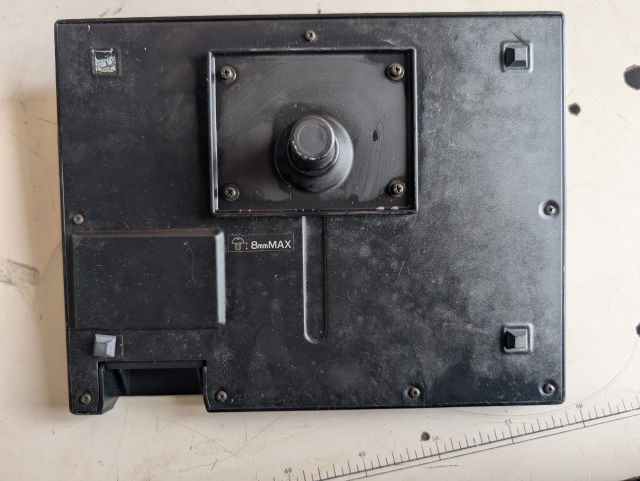
I acquired the optional stand adapter, which mounts the PM-16 to a
standard drum clamp for a drum stand. These are very practical as it
places the PM-16 right in front of you as you play the drums.
There were some firmware revisions to address MIDI transmission and
input channel trigger problems. The latest known revision is v1.10
issued in 1990 which addressed a crosstalk triggering problem,
especially if using a Roland PD-31 pad.
If you're using an old USS drum stand with circular cross bars,
those tend to have worse problems with crosstalk because the cross
bars resonate. My Pearl drum stand has fewer crosstalk issues.
A CR2032 coin battery in the PM-16 is used to retain user patch
memory with the power off, and Roland recommends replacing the
battery every five years. My experience is that the battery life was
good for at least 15 years; when it finally did fail it was probably
because I had not powered it up for a long time. The procedure
should be done by a competent repair tech, as some delicate
disassembly is required to access the battery.
What I don't like: wall wart, plastic case, and MIDI patch sysex
that doesn't work. Both of those rule out the PM-16 for gigging,
because wall warts break or go missing, and plastic cases crack with
rough gig handling. No problem as it stays in the studio, I do not
gig an electronic drum set. The wall wart should be 9VDC minimum
300mA tip negative (I don't know the barrel diameters).
People sometimes ask why I have so few gear from Roland, Korg, or
Yamaha; here's why. I
don't apologize for being a tough customer.

Home